Important Preventative Maintenance for Mobile Computer Carts
By First Products on Nov 9th 2022
Mobile computer carts are used throughout healthcare environments to bring computers, tablets, displays, documentation tools and other technology directly to the point of care. Because these workstations move between rooms and may be used throughout multiple shifts, routine preventive maintenance can help keep them safe, clean, maneuverable and ready for clinical workflows.
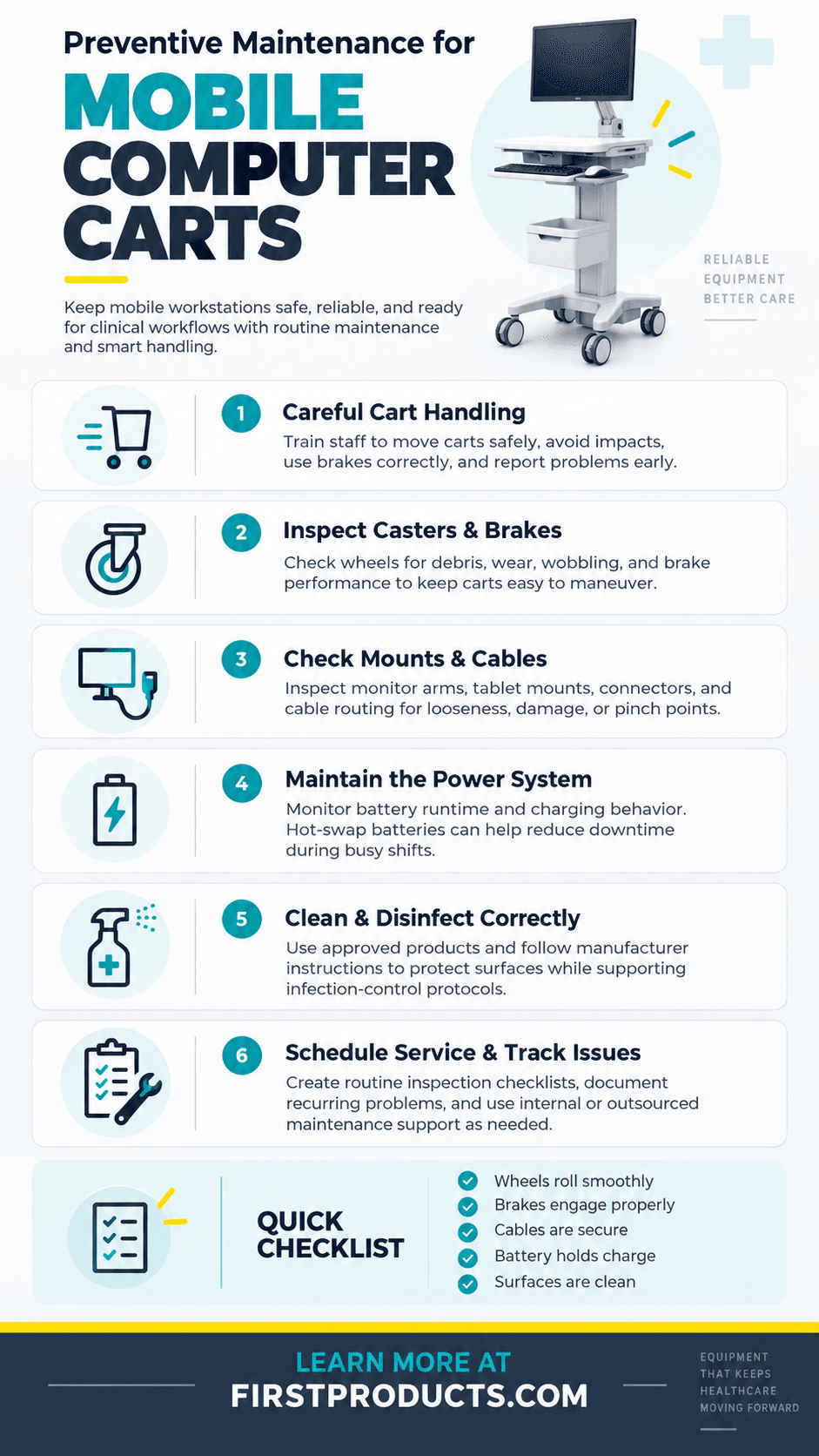
Preventive maintenance for a medical computer cart should typically include inspecting casters and brakes, checking mounting hardware and cables, maintaining the power system, cleaning compatible surfaces, identifying loose or damaged components, and documenting recurring performance issues.
Taking care of small problems before they become larger ones can reduce unexpected equipment downtime and help healthcare organizations get more value from their mobile workstation investments.
Why Is Preventive Maintenance Important for Medical Computer Carts?
In healthcare environments such as hospitals and acute care facilities, clinicians depend on technology being available when and where it is needed. A difficult-to-roll caster, loose monitor mount, damaged cable or unreliable power system can interfere with an otherwise efficient workflow.
A preventive maintenance program helps healthcare organizations identify wear before equipment fails. It can also support:
- More consistent cart availability
- Safer and easier maneuverability
- Longer equipment service life
- Better power-system reliability
- Cleaner and easier-to-maintain workstations
- Fewer emergency maintenance requests
- Earlier identification of damaged accessories, mounts or cables
The appropriate maintenance schedule will vary based on cart design, usage, environment and manufacturer recommendations. A cart operating continuously across multiple hospital shifts may require more frequent inspection than equipment used occasionally in a lower-volume setting.
1. Train Staff to Handle Mobile Carts Correctly
Preventive maintenance begins with everyday use. Even a well-designed mobile medical cart can experience unnecessary wear when it is repeatedly pushed into walls, pulled by attached cables, overloaded or moved without releasing its brakes.
Basic user training should cover how to:
- Move and steer the cart safely
- Use caster locks and brakes correctly
- Adjust monitors, keyboards, tablets and work surfaces without forcing components
- Connect and disconnect power cables properly
- Avoid placing excessive weight on work surfaces or accessories
- Report loose, damaged or unusually difficult-to-operate components
Staff members do not need to become cart technicians. They should, however, know what normal operation feels like and recognize when something has changed.
A wheel that suddenly becomes difficult to turn, an articulating arm that no longer holds its position or a cable that repeatedly becomes pinched should be reported rather than worked around.
2. Inspect Casters, Wheels and Brakes
Casters are among the hardest-working components on a mobile workstation. They travel across flooring transitions, thresholds and elevators while supporting the weight of the cart and installed technology.
Routine inspections should look for:
- Hair, fibers or debris wrapped around caster axles
- Wheels that wobble, drag or no longer rotate smoothly
- Loose caster mounting hardware
- Brakes that do not engage or release properly
- Uneven wheel wear
- Unusual vibration or noise during movement
A cart that becomes noticeably harder to push should be inspected rather than treated as a normal part of aging. Increased rolling resistance can affect maneuverability and may indicate that a caster needs cleaning, adjustment or replacement.
3. Check Mounts, Fasteners and Adjustable Components
Mobile carts frequently support monitors, computers, tablets, keyboards, scanners and other devices. Movement and repeated adjustments can gradually affect mounting hardware.
Maintenance teams should periodically inspect accessible fasteners, handles, shelves, keyboard trays and mounting points according to the manufacturer's recommendations.
Pay particular attention to components that users adjust frequently. Monitor arms and tablet mounts should move through their intended range of motion while remaining stable in the selected position.
If a component feels loose, slips unexpectedly or requires excessive force to adjust, it should be evaluated before continued use.
4. Inspect Cables and Cable Management
Cable management is easy to overlook, but damaged or poorly routed cables can create reliability and workflow problems.
Inspect power and peripheral cables for:
- Pinching near moving components
- Excessive bending or tension
- Frayed insulation
- Loose connectors
- Cables hanging near wheels or the floor
- Cords that interfere with height-adjustment or articulating components
Cables should have enough slack to allow intended cart adjustments without becoming caught in moving parts. At the same time, excess cable should be securely managed so it does not interfere with maneuverability.
5. Maintain the Cart's Power System
For powered workstations, battery performance has a direct impact on mobility. A cart that must frequently be plugged into an outlet can lose much of the flexibility that makes mobile computing valuable.
Organizations should monitor battery runtime and investigate significant reductions in performance. Battery age, charging behavior, connected equipment and workstation configuration can all influence runtime.
Consider Hot-Swap Battery Systems for Continuous Workflows
Hot-swap battery systems can simplify power management by allowing staff to replace a depleted battery with a charged battery rather than taking the workstation out of service for an extended recharge cycle.
With the appropriate system, a charged battery can be removed from a charging station and exchanged at the workstation, helping support longer mobile workflows.
This is particularly useful when carts need to remain available throughout multiple shifts. Traditional rechargeable cart power systems and battery-swapping technologies each have advantages, so healthcare organizations should consider runtime requirements, charging infrastructure and workflow when selecting a solution.
Reliable mobile power can also support efficient patient care and technology-enabled workflows by helping clinicians keep their workstation available where it is needed.
6. Clean and Disinfect Cart Surfaces Correctly
Mobile workstations may travel through multiple patient-care spaces and be touched frequently throughout the day. Cleaning should therefore be incorporated into the facility's established infection-prevention and equipment-maintenance procedures.
Always follow the equipment manufacturer's cleaning instructions and your facility's infection-control policies when selecting cleaning or disinfecting products. Not every chemical is compatible with every plastic, coating, screen, keyboard, seal or electronic component.
Repeated use of an incompatible chemical may damage some materials over time, so the strongest available cleaning product is not necessarily the most appropriate choice.
A cleaning protocol should clearly establish:
- Which surfaces are cleaned and disinfected
- Which products are approved for use
- Required product contact or dwell time, when applicable
- How frequently the workstation should be cleaned
- Which department or staff member is responsible
- How electronics, displays and accessories should be handled
Healthcare organizations selecting new equipment may also want to consider cleanability during the purchasing process. For example, First Products offers ergonomic tablet and iPad medical cart solutions designed for healthcare workflows.
7. Inspect the Work Surface and Frequently Touched Areas
Beyond cleaning, look closely at the condition of the cart's physical surfaces.
Inspect handles, work surfaces, keyboard trays, drawers and other high-use areas for:
- Cracks
- Chipped or damaged surfaces
- Loose edges
- Damaged handles
- Areas that have become difficult to clean
Damage that affects cleanability, stability or safe operation should be evaluated promptly rather than simply documented for future service.
8. Check Cart Ergonomics and Adjustability
Adjustable components should remain easy to operate throughout the life of the workstation.
Test height-adjustment mechanisms, monitor positioning, keyboard trays, handles and tablet arms. The cart should continue to accommodate its intended users without requiring excessive force to reposition components.
If an adjustable part begins sticking, drifting or failing to hold its position, maintenance personnel should inspect it before the problem becomes more severe.
9. Create a Preventive Maintenance Schedule
Waiting until a cart fails is not a preventive maintenance strategy. Healthcare organizations can create a recurring inspection process based on manufacturer recommendations, equipment age, usage and clinical environment.
A practical cart maintenance checklist might include:
| Component | What to Check |
|---|---|
| Casters and wheels | Smooth rolling, debris, wear and mounting security |
| Brakes | Proper engagement and release |
| Mounting hardware | Loose components, stability and proper adjustment |
| Cables | Pinching, fraying, tension and connector condition |
| Battery/power system | Runtime, charging behavior and physical condition |
| Work surfaces | Damage, cracks and cleanability |
| Adjustable components | Smooth movement and ability to remain in position |
| Accessories | Security, condition and proper operation |
| Overall cart | Unusual noise, movement, looseness or visible damage |
10. Document Recurring Problems
Maintenance records can reveal patterns that individual repair requests may not.
For example, if multiple carts experience the same caster issue, cable damage or premature battery degradation, the problem may reflect the operating environment, workflow or configuration rather than normal isolated wear.
Tracking the cart, issue, repair date and replaced components can help facilities make better decisions about service, replacement and future workstation specifications.
Should Medical Cart Maintenance Be Outsourced?
Some healthcare organizations handle preventive maintenance internally through facilities, biomedical engineering or IT departments. Others use outside service providers or a combination of internal and external resources.
There is no single approach that is appropriate for every facility.
An internal team may already understand the facility's equipment and workflow, while outsourcing specialized maintenance can help reduce demands on internal resources and provide access to technicians familiar with specific systems.
Regardless of who performs the work, technicians should understand the workstation, installed technology and applicable manufacturer recommendations.
Preventive maintenance can offer important operational benefits when incorporated into a broader equipment-management strategy. Learn more about the benefits of healthcare technology designed for clinical environments.
How Often Should Medical Computer Carts Be Inspected?
There is no universal inspection interval for every medical computer cart. Maintenance frequency should be determined by the cart manufacturer's recommendations, amount of use, power-system requirements, facility policies and operating environment.
High-use workstations may benefit from quick routine visual checks combined with more comprehensive scheduled inspections. Any cart showing abnormal movement, loose hardware, damaged electrical components or other signs of deterioration should be evaluated without waiting for the next scheduled inspection.
Key Takeaways for Maintaining Mobile Medical Computer Carts
- Train staff to move, adjust and operate carts correctly.
- Inspect wheels, casters and brakes for wear or resistance.
- Check monitor mounts, tablet arms, fasteners and adjustable components.
- Inspect cables for damage, pinching and poor routing.
- Monitor battery runtime and charging performance.
- Use cleaning products that are compatible with cart materials and follow manufacturer instructions.
- Assign clear responsibility for routine cleaning and maintenance.
- Document recurring problems to identify larger equipment or workflow trends.
A well-maintained mobile cart should support clinical work rather than becoming another problem clinicians have to solve. A consistent preventive maintenance program can help healthcare organizations protect their workstation investment while keeping equipment available, mobile and ready for everyday use.
Frequently Asked Questions About Medical Computer Cart Maintenance
What maintenance does a medical computer cart need?
Routine medical computer cart maintenance generally includes checking casters and brakes, inspecting mounting hardware, evaluating cables and electrical connections, monitoring batteries and charging systems, testing adjustable components, inspecting surfaces for damage and cleaning the workstation according to manufacturer and facility guidelines.
How often should a medical computer cart be serviced?
Service intervals depend on manufacturer recommendations, usage levels, the operating environment and facility maintenance policies. High-use carts may require more frequent inspection than workstations used only occasionally.
What are common problems with mobile medical carts?
Common maintenance concerns include worn or obstructed casters, ineffective brakes, loose mounts, damaged cables, reduced battery runtime, sticking adjustment mechanisms and damaged work surfaces.
Can medical computer carts be cleaned with hospital disinfectants?
Cleaning and disinfecting products should be selected according to the cart and equipment manufacturers' instructions and the healthcare facility's infection-control protocols. Some chemicals can damage plastics, coatings, displays or other materials when they are not compatible with the equipment.
Why are hot-swap batteries useful on medical carts?
Hot-swap batteries can allow a depleted battery to be exchanged for a charged battery without requiring the entire mobile workstation to remain connected to an outlet for an extended charging period. This can be useful for carts that need to support long or continuous clinical workflows.
Explore Mobile Healthcare Workstation Solutions
First Products develops mobile carts and mounting solutions for healthcare technology and clinical workflows. Choosing equipment that is designed for mobility, adjustability, cleanability and ongoing service can make preventive maintenance easier throughout the workstation's lifecycle.
Explore First Products to learn more about mobile computing and healthcare workstation solutions.